Head-to-Head: Acer Chromebook Plus Spin 514 vs Lenovo Chromebook Plus 14 Inch (Detailed Comparison)
The landscape of ChromeOS has shifted significantly since the introduction of the "Chromebook Plus" standard. Before this initiative, buyers often had to navigate a murky sea of underpowered processors and dim displays to find a device that could handle more than a few browser tabs. Today, Google has established a baseline of performance that ensures every device wearing the Plus badge offers at least a 1080p camera, a high-definition IPS display, and enough processing power for AI-enhanced tasks and creative work. Two of the most prominent contenders in this refined category are the Acer Chromebook Plus Spin 514 and the Lenovo Chromebook Plus 14 Inch.
While both laptops adhere to the same performance standards, they target different user priorities. The Acer Spin 514 is built for those who value versatility and a tactile experience, utilizing a 360-degree hinge that transforms the laptop into a tablet or a "tent" for media consumption. On the other hand, the Lenovo Chromebook Plus 14 Inch (often referred to in the IdeaPad Slim 3i line) focuses on being a reliable, high-value clamshell that provides a stable workstation for students and remote employees. This comparison dives deep into the hardware, performance, and everyday usability of these two machines to help you decide which belongs on your desk.
Design and Build Quality: Versatility vs. Classic Professionalism
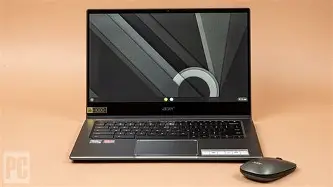
The most immediate difference between these two machines is their form factor. The Acer Chromebook Plus Spin 514 is a convertible laptop. This 2-in-1 design is inherently more complex, requiring robust hinges that can withstand being flipped back and forth thousands of times. Acer has a long history of building durable "Spin" models, and the 514 is no exception. It often features a reinforced chassis that meets MIL-STD 810H durability standards, meaning it can survive the vibrations of a daily commute, extreme temperatures, and the occasional minor drop from a desk. The aluminum top cover gives it a premium feel, while the weight—usually around 3.3 to 3.5 pounds—remains manageable for a device that doubles as a large tablet.
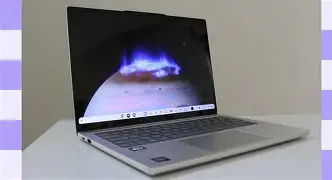
The Lenovo Chromebook Plus 14 Inch takes a more traditional approach. As a clamshell device, it doesn't have the transformation tricks of the Acer, but it gains points for sleekness and simplicity. Lenovo’s design language is typically understated, featuring a matte finish and a slim profile that fits easily into any backpack. While the build is often high-quality plastic or a hybrid of aluminum and polycarbonate, it feels remarkably stiff and well-assembled. It is generally lighter than the Acer, making it the preferred choice for those who move from office to meeting room without needing the tablet mode. Buyers who prefer a laptop that stays flat on a table and offers a "no-nonsense" aesthetic will find the Lenovo more aligned with their tastes.
Display Quality and Interaction
Interaction is where the Acer Spin 514 truly shines. Because it is a convertible, it features a 14-inch touchscreen as a standard requirement. The screen is protected by Antimicrobial Corning Gorilla Glass, which is not only durable but also provides a smooth gliding surface for fingers or a stylus. The 1080p IPS panel offers wide viewing angles, which is critical when using the device in tent mode for presentations or watching movies. Colors are vibrant enough for photo editing in applications like Adobe Photoshop (via the web or Android app), and the brightness typically hovers around 250 to 300 nits—sufficient for indoor environments, though perhaps a struggle under direct sunlight.
The Lenovo Chromebook Plus 14 Inch also provides a 14-inch 1080p IPS display, but the experience is different. Many of the Lenovo models in this category feature an anti-glare coating on a non-touch screen. While this might seem like a disadvantage compared to the Acer, it is a blessing for those who work near windows or under bright office lights. The matte finish eliminates the harsh reflections that often plague the glossy Gorilla Glass of the Acer. While touch-enabled versions of the Lenovo exist, the primary focus is on a traditional viewing experience. The color accuracy is comparable to the Acer, keeping it within the Chromebook Plus requirements, ensuring that spreadsheets are crisp and video calls look professional.
Keyboard, Trackpad, and User Experience
For many users, the quality of the keyboard is the "make or break" feature of a laptop. Lenovo has long been praised for its keyboard ergonomics, even in its more affordable Chromebook lines. The Chromebook Plus 14 Inch features well-spaced keys with a tactile "U-shape" that guides the fingers toward the center of the key. The travel distance is satisfying, allowing for fast, accurate typing during long essay sessions or coding marathons. The trackpad is spacious and supports all the standard ChromeOS gestures with a smooth, responsive surface.
Acer counters with a keyboard that is equally competent but feels slightly different. The keys on the Spin 514 usually have a slightly firmer reset, which some users prefer for the "clicky" feedback. A significant advantage for the Acer is the inclusion of a backlit keyboard on most configurations—a feature that is essential for students working in dim dorm rooms or travelers on overnight flights. The trackpad on the Acer is often made of OceanGlass—a recycled plastic material that mimics the feel of glass—providing an eco-friendly touch that doesn't sacrifice the "slick" sensation required for precise cursor control.
Find top-rated Laptops & Computers products at great prices.
See Deals →Performance: Under the Hood
Both devices are powered by the latest generation of processors designed for the Chromebook Plus ecosystem. Typically, this means you will find either an Intel Core i3 (12th or 13th Gen) or a comparable AMD Ryzen 3 or 5 processor. Both machines come with at least 8GB of LPDDR5X RAM, which is the current "sweet spot" for ChromeOS. This allows users to keep dozens of tabs open, run a Linux development environment, and stream 4K video simultaneously without the system stuttering.
In real-world performance tests, the Acer Spin 514 often excels in tasks that utilize its touch interface, such as navigating Android apps or using drawing software. The AMD variants of the Spin 514 are particularly well-regarded for their integrated graphics performance, making them slightly better for light gaming via the Google Play Store. The Lenovo, frequently equipped with Intel’s "U" series processors, is a master of efficiency. It handles heavy Google Sheets with ease and provides a snappy experience when switching between different Chrome Profiles.
Port Selection and Connectivity
In an era where many thin laptops are stripping away ports, both Acer and Lenovo have remained generous to the user. On the Acer Spin 514, you typically get two USB Type-C ports (one on each side for convenient charging), a USB Type-A port for older peripherals, and a dedicated HDMI port. The inclusion of an HDMI port is a massive win for teachers and professionals who frequently connect to projectors or external monitors without wanting to carry a dongle.
The Lenovo Chromebook Plus 14 Inch follows a similar path but sometimes opts for a more streamlined layout. It generally includes the same two USB-C ports and a USB-A port. Depending on the specific sub-model, you might find a microSD card slot, which is excellent for photographers who want to quickly offload images from a camera. Both laptops support Wi-Fi 6 or 6E, ensuring that you can take advantage of high-speed internet connections for seamless cloud-based work.
Detailed Comparison Table
| Feature | Acer Chromebook Plus Spin 514 | Lenovo Chromebook Plus 14 Inch |
|---|---|---|
| Form Factor | 2-in-1 Convertible (360-degree hinge) | Clamshell (Standard Laptop) |
| Display | 14" FHD IPS Touchscreen, Gorilla Glass | 14" FHD IPS (Touch optional), Anti-glare |
| Processor | Intel Core i3/i5 or AMD Ryzen 3/5 | Intel Core i3-1215U or similar |
| Memory | 8GB / 16GB LPDDR5X | 8GB LPDDR5X |
| Storage | 128GB / 256GB / 512GB SSD | 128GB / 256GB UFS or SSD |
| Webcam | 1080p with Temporal Noise Reduction | 1080p with Privacy Shutter |
| Battery Life | Approx. 10 hours | Approx. 10-12 hours |
| Weight | ~3.4 lbs | ~3.1 lbs |
Pros and Cons: Acer Chromebook Plus Spin 514
- Pros:
- Highly versatile 2-in-1 design is perfect for media, notes, and presentations.
- Gorilla Glass touchscreen provides a premium, durable feel for stylus use.
- Excellent port selection including a native HDMI port for easy docking.
- Military-grade durability (MIL-STD 810H) ensures longevity in tough environments.
- Backlit keyboard is often standard, making it great for late-night productivity.
- Cons:
- Slightly heavier than the average 14-inch clamshell laptop.
- The glossy screen can be prone to glare in brightly lit outdoor settings.
- Generally carries a higher price tag due to the complex hinge and touchscreen hardware.
Pros and Cons: Lenovo Chromebook Plus 14 Inch
- Pros:
- Traditional clamshell design is lightweight and very portable for daily transit.
- Anti-glare screen coating makes it more comfortable for long workdays in high-light areas.
- The keyboard is world-class, offering a superior typing experience for writers.
- Physical webcam privacy shutter offers peace of mind for security-conscious users.
- Often priced more aggressively, offering incredible value for the internal specs.
- Cons:
- Lacks the versatility of a tablet mode or tent mode for entertainment.
- Touchscreen is not always standard, which may limit Android app usability.
- The chassis, while sturdy, often uses more plastic than the metal-topped Acer.
Buying Guide: Which One Should You Choose?
Choosing between these two excellent devices usually comes down to identifying your primary use case. Because they both meet the Chromebook Plus specification, you are guaranteed a high-quality experience regardless of your choice, but your daily habits will dictate which one feels "right."
Recommended for Students and Creatives: Acer Spin 514
If you are a student who needs to take handwritten notes (with a compatible USI stylus) or someone who enjoys watching Netflix in bed, the Acer Spin 514 is the clear winner. The ability to flip the screen into tent mode makes it an excellent companion for small dorm desks where space is at a premium. Furthermore, the touchscreen makes it much easier to interact with creative apps like LumaFusion for video editing or Canva for graphic design. The extra durability also helps if you are frequently tossing your laptop into a bag between classes.
Recommended for Remote Workers and Writers: Lenovo 14 Inch
For those whose day consists of emails, reports, and long stretches of research, the Lenovo Chromebook Plus 14 Inch is likely the better tool. The lighter weight is appreciated during a long commute, and the anti-glare screen is far easier on the eyes during an eight-hour shift. If you rarely find yourself needing a tablet and prefer a laptop that "just works" as a focused workstation, the Lenovo provides a better typing experience and arguably better value. The privacy shutter is also a nice touch for those who spend a large portion of their day in video meetings.
Shop the latest Laptops & Computers picks on Amazon.
View Offers →Consider Your Environment
Environmental lighting is a frequently overlooked factor. If you often work in coffee shops with large windows or in offices with overhead fluorescent lights, the Lenovo’s matte screen will save you from constant eye strain. However, if your work involves sharing your screen with a colleague sitting next to you, the Acer’s glossy IPS panel typically offers slightly better color punch and clarity at side angles, provided reflections are kept in check.
Software and AI Features: The Chromebook Plus Advantage
It is important to remember that both of these laptops benefit from the exclusive software suite provided to Chromebook Plus owners. This includes the "Help Me Write" feature, which uses generative AI to help refine emails or blog posts directly in the browser. Both laptops also feature advanced Google Photos tools like the Magic Eraser, allowing you to remove unwanted background objects from your pictures with a simple click.
Furthermore, the 1080p webcams on both devices are enhanced by AI-driven system-level controls. This means you can blur your background, improve lighting, and cancel out background noise across any video conferencing app, whether you are using Google Meet, Zoom, or Microsoft Teams. Because both Acer and Lenovo included high-quality sensors and dual-microphone arrays, you will look and sound far better than you would on an entry-level Chromebook from years past.
Conclusion
The Acer Chromebook Plus Spin 514 and the Lenovo Chromebook Plus 14 Inch represent the "new guard" of ChromeOS devices—laptops that no longer compromise on performance or build quality. The Acer Spin 514 is a masterpiece of versatility, offering a premium 2-in-1 experience that adapts to your environment, whether you are working, presenting, or relaxing. Its rugged build and touchscreen excellence make it a top-tier choice for those who want a device that can do everything.
Conversely, the Lenovo Chromebook Plus 14 Inch is a testament to the power of a specialized tool. By focusing on the core laptop experience, Lenovo has created a machine that is light, comfortable to type on, and visually soothing for long-term use. It offers a professional aesthetic and focused performance that is hard to beat at its price point. Both laptops proudly carry the Plus badge, ensuring that whichever one you choose, you are getting a machine ready for the modern demands of the web, cloud computing, and creative productivity.